

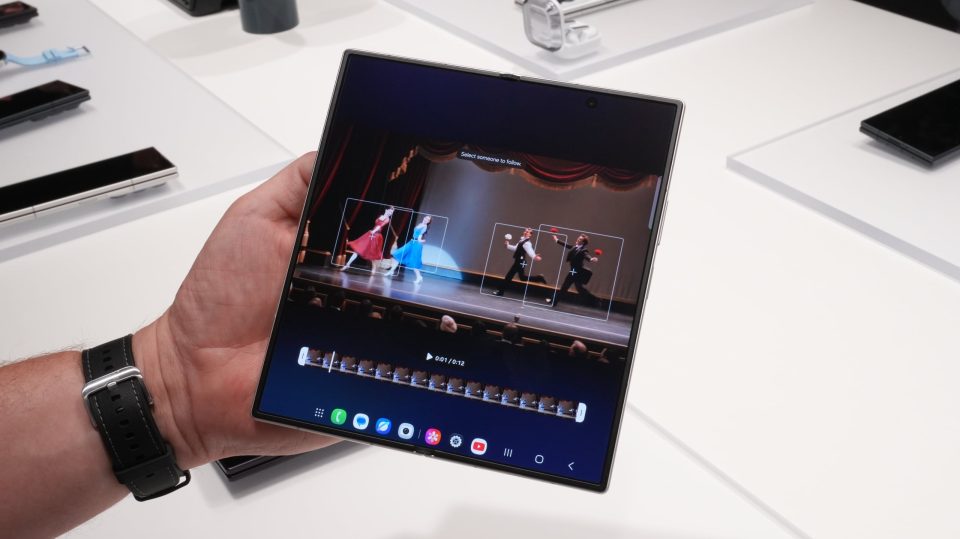
Samsung has introduced My FanCam, a Gallery-based editing tool that uses Galaxy AI to turn group videos into single-subject “fan cam” clips on the new Galaxy Z Flip 8, Galaxy Z Fold 8 and Galaxy Z Fold 8 Ultra running One UI 9. Unlike live Auto Framing, My FanCam is applied after recording to crop and track a chosen person or subject within an existing video.
## My FanCam: how it works
To use My FanCam, open a saved video in the Gallery app on a Z Flip 8, Fold 8 or Fold 8 Ultra and tap the new My FanCam button shown next to Audio Eraser. You pick an aspect ratio and select the person or subject you want to track; the AI then crops the frame and keeps that subject centered as they move, producing the effect of a dedicated fan cam. If the tool cannot identify a trackable subject in a clip, the My FanCam options will not appear.
## What sets it apart from Auto Framing
Auto Framing operates in real time while recording, adjusting framing as subjects move. My FanCam performs a similar tracking and cropping result but as a post-editing function inside Gallery. That makes it useful for repurposing existing footage rather than relying on the camera’s live framing mode.
## Availability and rollout
At launch, My FanCam is available only on Samsung’s Z8-series foldables: the Galaxy Z Flip 8, Galaxy Z Fold 8 and Galaxy Z Fold 8 Ultra. Those
