

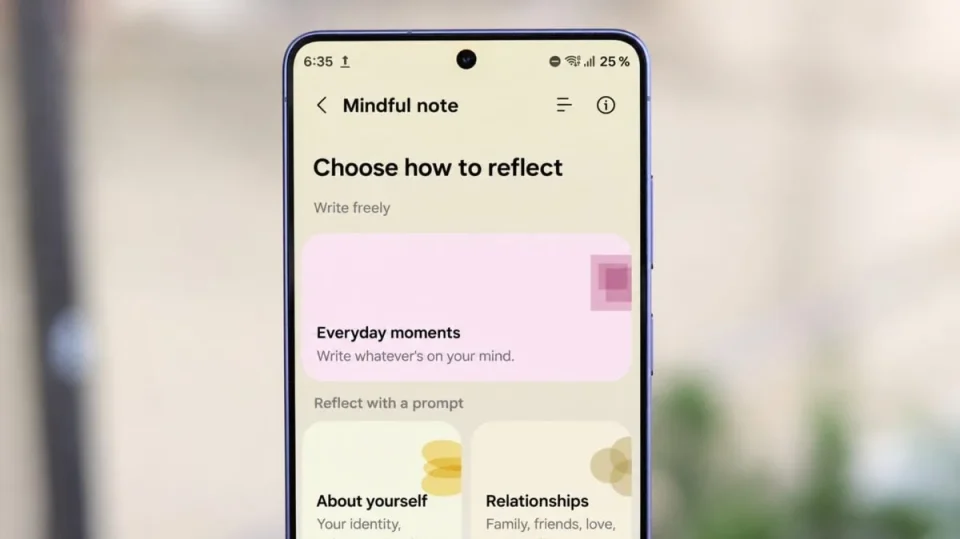
Samsung Health’s new Mindful note journaling feature is available in the One UI 9.5 beta. We tried it and found you can write about your day, reflect on feelings, answer prompts to get started, attach photos to entries and perform a mood check-in after saving.
How Mindful note works
Mindful note appears in Samsung Health’s Mindfulness section alongside mood check-ins, breathing exercises and meditation. When you open it there are two ways to begin: Everyday moments provides a blank space to write freely, while Prompts offers questions sorted into four categories — About yourself, Relationships, Work and goals, and What if…? — each with a short explanation to help reflection. Prompts cover personal experiences, relationships and career planning; examples include asking what a recent mistake taught you about yourself and what a healthy work-life balance looks like to you. A refresh button lets you switch to another prompt within the same category.
Photos, mood check-ins and tags
Entries can include photos as well as text; in our testing we added a picture from the phone’s gallery and saved the entry with the photo displayed above the text. After saving, Samsung Health asks how you’re feeling, offering Awesome, Good, Fine, Bad or Terrible — integrating the app’s existing mood check-in into the journaling flow. Choosing one of those responses opens a more detailed check-in where you can select specific emotions such as joyful, calm, grateful, anxious or stressed; the order of those options adapts based on the mood you selected. You can also record factors contributing to your mood using tags for sleep, exercise, work, money, family, friends and pets, and the app may suggest trying a breathing exercise after you write a note.
Viewing and managing entries
A list button on the main Mindful note screen opens saved entries, which are grouped by date and display the category, time and a preview of the note. The interface includes controls for editing entries and selecting notes to delete.
