

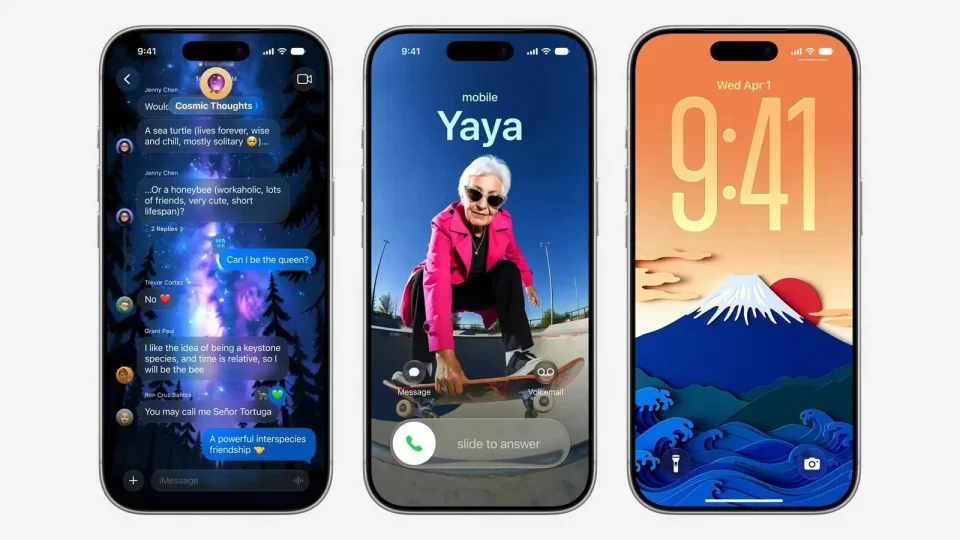
Apple announced at its September 9 event that iOS 27 will be released to all users with compatible iPhones on Monday, September 14. The update has been available as a developer beta since June and as a public beta since July; the rollout is expected to begin at approximately 10 a.m. Pacific Time / 1 p.m. Eastern Time. Apple also said iPadOS 27, macOS 27, watchOS 27, tvOS 27 and visionOS 27 will be released the same day.
Release details
The iOS 27 release will be offered to all supported iPhones via Settings > General > Software Update. While the update has been in beta for months, Apple indicated the public release will reach users on Monday, September 14, with the approximate rollout time noted above.
Compatible iPhones
iOS 27 supports the same iPhone models as iOS 26 — iPhone 11 series and newer. Siri AI and other Apple Intelligence features require an iPhone 15 Pro or newer.
The following iPhone models are compatible with iOS 27:
iPhone 18 Pro
iPhone 18 Pro Max
iPhone Duo
iPhone 17e
iPhone 17
iPhone 17 Pro
iPhone 17 Pro Max
iPhone Air
iPhone 16e
iPhone 16
iPhone 16 Plus
iPhone 16 Pro
iPhone 16 Pro Max
iPhone 15
iPhone 15 Plus
iPhone 15 Pro
iPhone 15 Pro Max
iPhone 14
iPhone 14 Plus
iPhone 14 Pro
iPhone 14 Pro Max
iPhone 13
iPhone 13 mini
iPhone 13 Pro
iPhone 13 Pro Max
iPhone 12
iPhone 12 mini
iPhone 12 Pro
iPhone 12 Pro Max
iPhone 11
iPhone 11 Pro
iPhone 11 Pro Max
iPhone SE (2nd generation and later)
What’s new in iOS 27
iOS 27 introduces a range of changes, led by a major upgrade to Siri and several Apple Intelligence features, alongside interface refinements, performance improvements and new capabilities for CarPlay and device handoff.
Siri AI
iOS 27 replaces the classic Siri with a more capable assistant called Siri AI. Described as a ChatGPT-like version of Siri, Siri AI can answer a wide variety of queries, draw on personal information stored on the iPhone, has on-screen awareness and can perform actions in more apps that support it. Apple added a dedicated Siri app, while the assistant can still be invoked by pressing and holding the iPhone’s side button.
Siri AI is limited to English at launch, will be subject to daily usage limits, and Apple said expanded access will be available for a fee in the future. The feature will not be initially available in the EU on iOS 27, iPadOS 27 and watchOS 27. Siri AI and other Apple Intelligence features require an iPhone 15 Pro or newer.
Other Apple Intelligence features
New Apple Intelligence additions include “Extend” and “Reframe” options in the Photos app, the ability to generate “photorealistic” images in the Image Playground app, creation of new Shortcuts by describing them, and generated video descriptions for HomeKit Secure Video cameras, among others.
Liquid Glass design refinements
Apple said Liquid Glass, introduced on iOS 26, has been refined for iOS 27 with “more uniform refraction and improved contrast,” and app icons that are “sharper and more detailed.” A new slider lets users adjust how clear or tinted Liquid Glass appears.
Performance improvements
Apple reported system-wide speed gains in iOS 27: app launches are up to 30% faster, new photos in the Photos library load up to 70% faster, and AirDrop transfers are up to 80% faster, among other optimizations.
iPhone Handoff
A new iPhone Handoff feature lets users switch between two iPhones while using the same phone number on each device. The capability requires carrier support, and carriers may charge a fee. T‑Mobile in the U.S. and Deutsche Telekom in Germany will be the first carriers to offer iPhone Handoff; T‑Mobile is set to charge $5 per month. Apple said Verizon and the UK’s EE plan to offer the feature by the end of the year, with more carriers to follow.
Apple Cash bill splitting (U.S. only)
In the U.S., iOS 27 adds a bill-splitting feature powered by Apple Cash and Apple Intelligence. Available in Wallet and Messages, and via Siri mode in the Camera app, the feature can surface an action to split a receipt and identify items when users point their iPhone at a receipt. As users select items, each person’s total — including their share of tax and tip — is calculated so they can pay back exactly what they owe with Apple Cash.
Find My: hide location and custom durations
Find My gains more granular location-sharing controls. You can now share location for a custom duration (for example, four days and six hours) or set an exact expiry date and time. You can also pause location sharing with specific people until the end of the day without notifying them — a feature Apple said is useful for events like planning a surprise.
CarPlay video apps
Apple is expanding CarPlay to support video in vehicles that enable it. When playing a video in an iPhone app that supports AirPlay video streaming, users can choose the car’s display from the AirPlay menu and watch on a compatible vehicle screen. New in iOS 27, developers can create CarPlay apps with video browsing so users can find videos on CarPlay. Apple said video playback is enabled only when the vehicle is parked and suggested use cases such as waiting in a car at the airport or charging an electric vehicle. CarPlay video will roll out in new vehicles that support the feature over time.
