

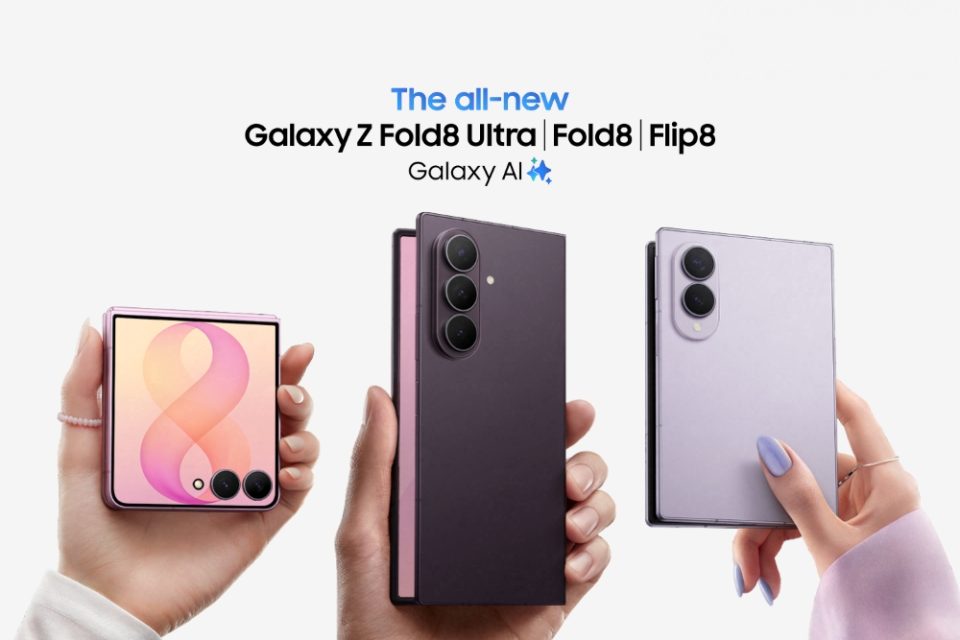
The Galaxy Z Flip8, Z Fold8 and Z Fold8 Ultra cater to different shooting habits: the Flip8 is optimized for quick rear-camera selfies and hands-free self-recording when partly folded, while the Fold8 and Fold8 Ultra provide larger displays for framing and reviewing shots, plus expanded macro and advanced video capabilities. The Fold8 Ultra adds a much higher-resolution main sensor and a dedicated telephoto for shooting subjects at a distance.
Which Galaxy Z foldable is best for rear-camera selfies?
All three let you use the rear cameras for selfies while framing yourself on the cover screen. On the Galaxy Z Flip8 you open the Camera app on the FlexWindow cover screen while the phone is folded to take selfies immediately with the 50 MP main camera, or set the phone down partly open in Flex mode for hands-free recording with a visible preview. On the Galaxy Z Fold8 and Fold8 Ultra you unfold the phone, open Camera and enable Cover screen preview; turn the phone so the rear cameras face you and drag the lock icon on the cover screen to access shooting controls there. That workflow gives access to the Fold8’s 50 MP main camera and the Fold8 Ultra’s 200 MP main camera. All three support switching to the ultra-wide camera.
How far can each Galaxy Z model zoom?
Each phone offers a 2x optical-quality zoom achieved by cropping the main sensor rather than switching to a separate lens. The Flip8 and Fold8 reach up to 10x total zoom in Photo mode; the Fold8 Ultra adds a dedicated 3x optical telephoto and extends to 30x total zoom. Zoom steps on the Fold8 Ultra are .6x, 1x, 2x, 3x, 10x, 20x and 30x, with digital zoom beyond 3x. The Fold8 and Flip8 provide .6x, 1x, 2x, 4x and 10x; on all three, .6x selects the ultra-wide camera. Portrait mode zoom options differ: the Fold8 and Flip8 let you adjust between 1x and 2x, while the Fold8 Ultra offers 1x, 2x, 3x and 5x (with intermediate levels available). Optical image stabilisation assists steadier shots at higher zoom levels.
Which Galaxy Z foldable is best for vlogging?
For self-recording, the Galaxy Z Flip8 is particularly convenient: you can stand it upright in Flex mode, record with the rear cameras and monitor framing on the cover screen while switching between wide and ultra-wide, recording up to 4K at 60 fps. The Galaxy Z Fold8 Ultra offers a hands-free alternative by partially unfolding the phone, placing it in landscape, and using the inner camera to record while watching the preview on the foldable display; the inner camera records up to 4K at 60 fps with a 100-degree field of view to include others in the frame. Auto framing, available on all three, automatically adjusts zoom to help keep you in frame before and during filming at 4K or Full HD at 30 fps.
Galaxy Z Flip8 vs Z Fold8 vs Z Fold8 Ultra camera specs
Key camera hardware and capabilities by model:
– Galaxy Z Flip8: Rear — 50 MP wide (F1.8) and 12 MP ultra-wide (F2.2); Inner camera — 10 MP (F2.2). Offers 2x optical-quality zoom and up to 10x max zoom in Photo mode. Rear video up to 4K at 60 fps. Selfie recording and rear-camera selfies while folded are supported.
– Galaxy Z Fold8: Rear — 50 MP wide (F1.8) and 50 MP ultra-wide (F1.9) with the ultra-wide handling macro; Cover-screen and inner cameras — 10 MP (F2.2). Offers 2x optical-quality zoom and up to 10x max zoom. Rear video — 8K at 30 fps on wide and ultra-wide; 4K at 60 fps. APV support available.
– Galaxy Z Fold8 Ultra: Rear — 200 MP wide (F1.7), 50 MP ultra-wide (F1.9) and 10 MP telephoto (F2.4) with 3x optical zoom; Cover-screen and inner cameras — 10 MP (F2.2), inner has 100-degree field of view. Offers 2x optical-quality zoom plus a 3x optical telephoto and up to 30x max zoom. Rear video — 8K at 30 fps on wide and ultra-wide; 4K at 60 fps. APV support available.
All three record 4K video at up to 60 fps with front and rear cameras; log recording and Cine LUT are available across the range.
Close-up photos and low-light handling
The Fold8 and Fold8 Ultra are recommended for macro photography: both use their 50 MP ultra-wide cameras for close-ups, and Focus enhancer can automatically switch to the ultra-wide when you move close to a subject. For close-up video, manually select the ultra-wide via the .6x button. In low light, all three support Nightography video processing to reduce noise and retain colour and detail; the Fold8 Ultra’s main camera is F1.7 while the Flip8 and Fold8 use F1.8 mains. The ProVisual Engine handles image processing across all models and Auto FPS can adjust frame rate for brighter low-light video. Flex mode can aid night photos by letting you stand the Flip8 or Fold8 Ultra partly folded on a stable surface for longer exposures.
Which Galaxy Z model is best for shooting video and group photos?
The Fold8 and Fold8 Ultra offer the broadest recording options, including 8K capture and APV (Advanced Professional Video) support for footage intended for heavy post-production. Both Folds support Super Steady and Super Steady with Horizontal Lock on wide and ultra-wide for steadier handheld footage; the Flip8 supports QHD and Full HD at 30 fps in Super Steady. My FanCam and Galaxy AI let you select a person in a recorded video and automatically track them, creating a cropped clip in the aspect ratio you choose. For group photos, cover screen preview helps subjects adjust while you frame on the main display; the Flip8 can be placed down like a tripod so you can join the group, and the Fold8/Fold8 Ultra’s 10 MP inner camera with a 100-degree field of view provides another group-selfie option.
Recording with two cameras at once
Dual recording is supported: a Dual recording button lets you film yourself and the scene simultaneously in split-screen or picture-in-picture, saving either a combined video or two separate files. Both Folds support Dual recording at 4K and Full HD 30 fps; the Flip8 records Dual at Full HD 30 fps. Samsung’s Camera Assistant app adds a dedicated Dual rec mode that lets you pair wide and ultra-wide rear cameras together or combine a rear camera with a front camera; the Fold8 Ultra also lets you include its telephoto.
Which Galaxy Z foldable camera is right for you?
Choose the Galaxy Z Fold8 Ultra if you prioritise the highest-resolution photos and optical zoom: its 200 MP main camera is best for detailed crops and its 3x telephoto helps with distant subjects, plus it supports macro, 8K video and APV. Pick the Galaxy Z Fold8 if you want a large-screen phone for framing wide-angle and close-up shots with two 50 MP rear cameras, macro support and 8K video. Opt for the Galaxy Z Flip8 if you frequently film yourself or take quick rear-camera selfies: its folded rear-camera selfie workflow and Flex mode make hands-free recording with a visible preview the simplest option.
