

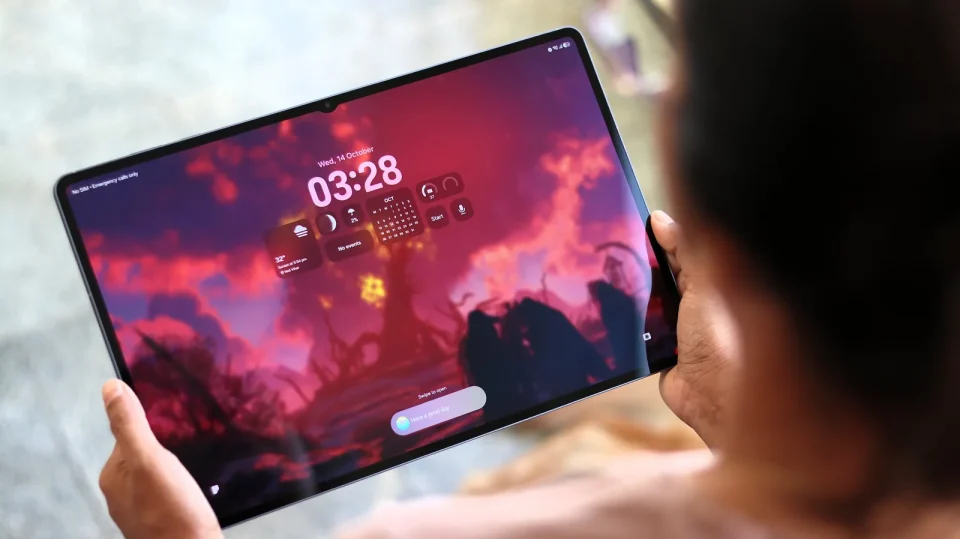
The Samsung Galaxy Tab S12 Ultra keeps the same oversized formula as its predecessor: a 14.6‑inch Dynamic AMOLED 2X display, a very thin 5.1mm aluminum body with IP68 resistance, and a design that pushes this tablet toward laptop territory when paired with the optional Pro Keyboard. Hardware updates include a faster MediaTek Dimensity 9500 chip, a redesigned cooling system, upgraded audio, and One UI 9 on top of Android 17, but the core experience remains familiar — and expensive.
Design and portability
The S12 Ultra resembles the previous model with slim bezels, a small front‑camera notch and a premium aluminum finish. The Wi‑Fi model weighs 692 grams (695 grams for the 5G variant), making it large to hold despite its thin profile. Samsung has retained IP68 water and dust resistance. The tablet’s size is an advantage on a desk but can feel unwieldy for casual use; the 12.6‑inch Tab S12+ is suggested as a smaller alternative for buyers who find the Ultra too large.
Samsung Galaxy Tab S12 Ultra display and audio
The tablet uses a 14.6‑inch Dynamic AMOLED 2X panel with a 2960 x 1848 resolution and up to 120Hz refresh. Samsung lists peak brightness at 1,600 nits and High Brightness Mode at 1,000 nits. The large screen enables useful multi‑app layouts, such as keeping a source beside a draft and a third window for messages or video. Samsung appears to have removed the anti‑reflective coating, making the display more reflective outdoors than the previous model.
Audio has been upgraded: the device still houses four speakers, but the system now supports four‑channel spatial/multichannel audio rather than being limited to two‑channel stereo. In testing with directional audio movies such as Gravity, sound panned between sides but still played on both speakers on one side in some cases. Overall, the speakers are loud (especially with Dolby Atmos enabled), deliver notable bass, and show some high‑frequency compression at full volume.
Pro Keyboard and S Pen
The optional Pro Keyboard is an aluminum attachable keyboard that connects via pogo pins and includes a dedicated Galaxy AI key. Samsung lists the keyboard weight at 636 grams; combined with the tablet (692–695 grams) the assembled device is about 1.33 kg, resembling a laptop in size and weight. The keyboard’s build and the lack of a Bluetooth pairing routine make the setup feel notebook‑like, but its $399.99 list price pushes the total cost much higher.
Samsung still includes the S Pen, which requires no pairing or charging for writing. The S Pen no longer supports Bluetooth Low Energy or remote Air actions, matching the change introduced with the S11 generation.
Software and productivity
The Tab S12 Ultra ships with Android 17 and One UI 9. Multi Window supports up to three split‑screen apps, and Samsung DeX offers a desktop‑style workspace with multiple workspaces. Samsung’s browser AI features can work with the current page, open tabs and browsing history to help find sources, but AI summaries still require verification against the original pages. Photoshop is listed as a new addition to the Tab S12 series, expanding creative workflows that benefit from the S Pen.
Samsung promises seven generations of OS upgrades and seven years of security updates from the global launch.
Performance and storage
Samsung moved from the Dimensity 9400+ to the Dimensity 9500, claiming up to 19% CPU and 17% GPU gains versus the Tab S11 Ultra. Those gains are most noticeable in demanding tasks like Photoshop and video editing; everyday browsing, documents and note‑taking were already well handled by the S11 Ultra. Configurations include 256GB and 512GB models with 12GB of RAM and a 1TB model with 16GB of RAM. A microSD slot supports cards up to 2TB. The tablet also supports Wi‑Fi 7 and Bluetooth 6.0.
Battery, charging and cameras
Battery capacity remains 11,600mAh with wired charging capped at 45W. Samsung’s lab figure of up to 23 hours of local video playback is based on a 720p test at 162 nits with wireless connections off. In more realistic testing—streaming a 720p Netflix video on Wi‑Fi at maximum manual brightness—the tablet lost about 10% per hour, equating to roughly 10 hours of continuous streaming. A 30‑minute charge yields around 40% with a compatible 45W adapter; a full charge takes a little over 80 minutes. A compatible charger is not included in the box.
The rear camera setup remains a 13MP main sensor plus an 8MP ultra‑wide, and the front camera is a 12MP ultra‑wide. Samsung has not made a major camera upgrade; the front camera is more relevant for video calls in a keyboard‑and‑desk setup, while the rear cameras suit document capture rather than phone‑grade photography.
Verdict
The Galaxy Tab S12 Ultra is compelling when the extra screen real estate solves real problems: keeping research beside a draft, running multiple apps simultaneously, or blending typed and handwritten notes. The Pro Keyboard transforms the package into a laptop‑like device, but its $399.99 price pushes the combined cost toward $1,800 at US list prices (the tablet starts at $1,399.99), before taxes or discounts. For Tab S11 Ultra owners, the S12 Ultra offers little reason to upgrade: screen, size, battery and charging remain familiar, and the Pro Keyboard is compatible with the previous model. Buyers coming from older tablets will find a current flagship processor, a large workspace and long‑term software support attractive; those unsure about size should consider the Tab S12+ or a discounted S11 Ultra instead.
