

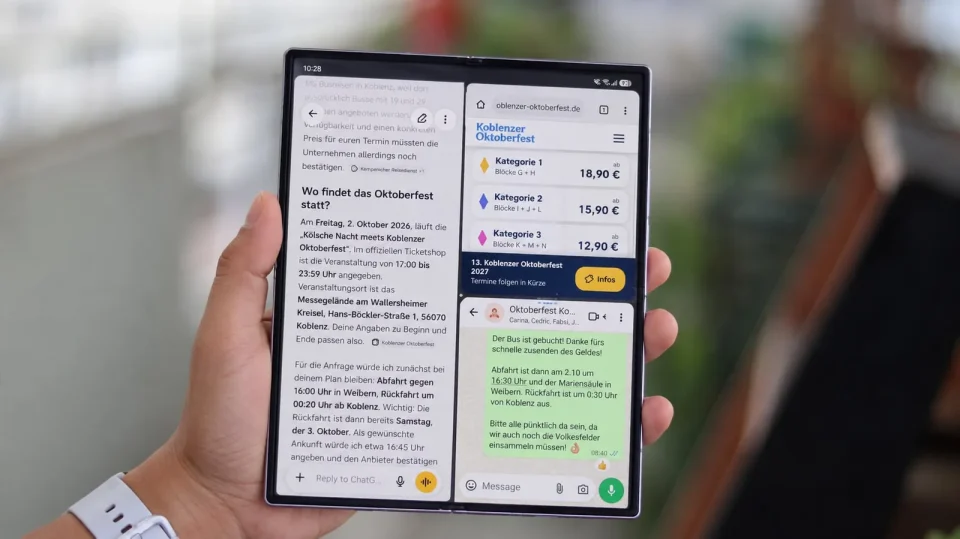
The Galaxy Z Fold 8 makes more effective use of its larger display than the iPhone Duo by supporting three apps side by side, compared with Apple’s Split View that places two apps next to each other. That extra slot can keep a conversation, reference material and a working app visible at once, reducing the need to switch between apps for a single task.
Galaxy Z Fold 8 multitasking advantages
A bigger screen eases video watching and reading, but its value grows when everyday tasks involve more than one app. Planning with friends, for example, often means checking details while keeping up with the chat. On the Fold 8, a three-app layout can hold the conversation, the information you’re checking and the search or booking you’re working on; on a two-app layout one element must move out of view.
Choosing a hotel illustrates the point: you might want the chat beside the hotel page while keeping a map open to check distances. Shopping could mean a product in a store app, a review in a browser and a conversation with the buyer. The apps change, but each window often has a distinct role in completing the task.
I used this approach planning an Oktoberfest outing: the group chat stayed open beside the event website and ChatGPT. The website provided ticket details, location and timings, while ChatGPT helped find bus companies to contact about travel. Having the chat, the event page and the planning tool visible at once reduced back-and-forth between apps.
My work follows a similar pattern: a post on X, its source in the browser and a team conversation in Slack. Keeping the original post, the research and the discussion visible together helps compare claims with findings and lets the conversation shape what to look up next.
Flexible layout and temporary tools
The Fold 8’s adjustable dividers let you allocate more space to the app you’re concentrating on while keeping the others alongside. Readability still matters—some content is better viewed alone, and two apps may be enough at times—but the option of a third visible element matters when tasks span multiple apps.
Temporary tools can sit over the main layout. A calculator or calendar can appear as pop-up windows that are movable, resizable and minimisable into floating icons, so a quick check doesn’t have to replace one of the main apps. Once finished, the tool can be put away and the primary task remains in view.
The taskbar makes building that setup simple: you can drag a supported app into split screen when needed. App Pair can save two or three apps as a shortcut on the taskbar, home screen or Apps Edge panel so a regular combination reopens with one tap. Apple lets users save app pairs; Samsung’s advantage is being able to save a three-app combination, then adjust it or bring in a temporary tool when the task requires one.
That flexibility gives a practical reason to unfold the phone. For anyone who regularly plans, compares or researches across apps, the Fold 8’s multitasking options make its extra screen space more useful without repeatedly hiding parts of the task.
