

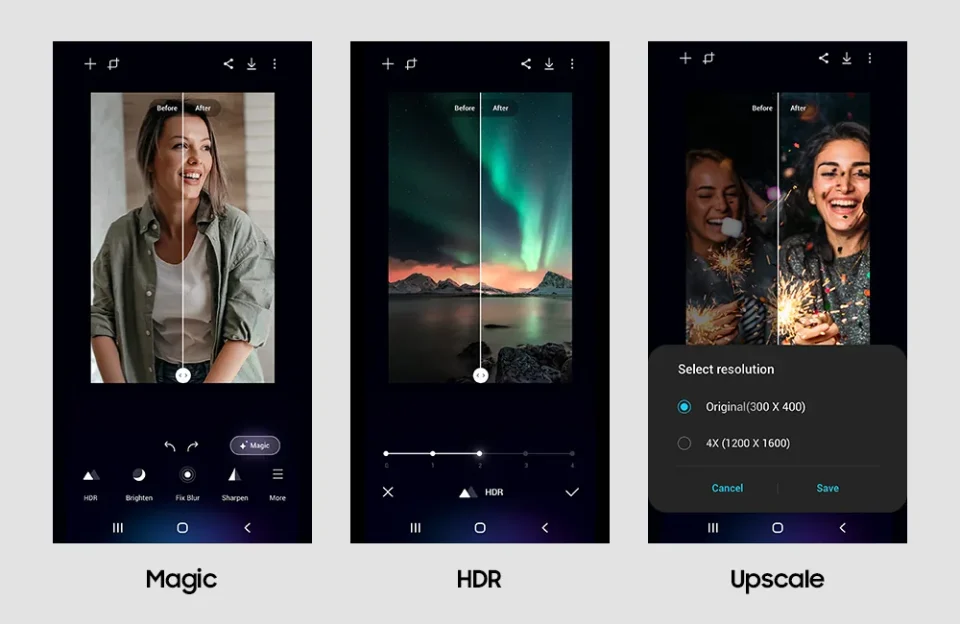
Samsung’s Galaxy Enhance-X image-editing app is receiving a major visual overhaul as part of One UI 9.5, with redesigns to its home screen, bottom navigation bar and the photo editing interface.
Galaxy Enhance-X home screen
The current app displays plugin banners at the top and an expandable section at the bottom for choosing photos and videos from the gallery. In the upcoming version, Samsung replaces that layout by showing images from your gallery directly on the home screen, letting users select a photo and jump straight into editing without relying on expandable menus.
Navigation bar adds History and Discover
The app’s floating bottom navigation bar currently includes three tabs: Plugins, Home and Library. The forthcoming release swaps Library for a History tab and adds a new Discover tab, increasing the total to four: Plugins, Home, History and Discover.
Redesigned photo editor and toolbar
The image editing interface has been substantially refreshed. Today’s version places Undo and Redo buttons on the left and a Save button on the right, all inside an oval pill container that floats over the lower portion of the image. The upcoming update removes that oval background and moves the buttons higher on the screen so they no longer obscure the image.
The editing toolbar itself moves away from a blue gradient, icon-only presentation to a solid black background with text labels beneath each tool icon, making features easier to identify. The Suggested tab, which the current editor opens to by default to recommend automated tweaks, has been removed in the upcoming version in favor of direct manual access.
