

Samsung has begun a global rollout of the stable One UI 9 Watch (Wear OS 7) update for the Galaxy Watch 8 and Galaxy Watch 8 Classic. The update was first released in South Korea and is now arriving in the US; Samsung says it will reach other countries over the next few days.
For non-cellular Galaxy Watch 8 Classic units enrolled in the beta program, the update is 158.50MB and carries firmware version L500XXU2BZJ7. The update for the other model is reported to be of a similar size and uses a firmware build that also ends with BZJ7.
You can check for availability and install One UI 9 Watch from the Galaxy Wearable app: open the app, go to Watch settings > Watch software update > Download and install.
One UI 9 Watch: redesigned Galaxy Wearable app and watch faces
The Galaxy Wearable app has a completely redesigned watch settings screen that emphasizes easier access to frequently used features and shows the current watch face as a high-resolution image. Finding and previewing watch faces has been reorganized into categories with detailed descriptions; the gallery now presents larger thumbnails so users can preview designs without tapping each item, and can swipe left or right on a thumbnail to view different color options and styles.
When viewing a specific watch face, the app will recommend similar options at the bottom of the screen. Users can discover matching faces by selecting fashion photos that match their style or receive recommendations based on the design of their current watch face. The watch face editor is simplified into two tabs: “Style” for appearance adjustments and “Complications” for configuring additional features, making it easier to identify and customize elements.
Galaxy Health and workout improvements
Health metrics such as sleep and heart health now use circular charts and a watch-optimized design for cleaner, more cohesive on-device presentation. A standardized color-coding system highlights health status and changes at a glance. The Samsung Health mobile app has been improved with a customizable home screen (adjustable card sizes) and clearer category views for activity, sleep, mindfulness and nutrition; charts can be zoomed or overlaid for easier trend analysis.
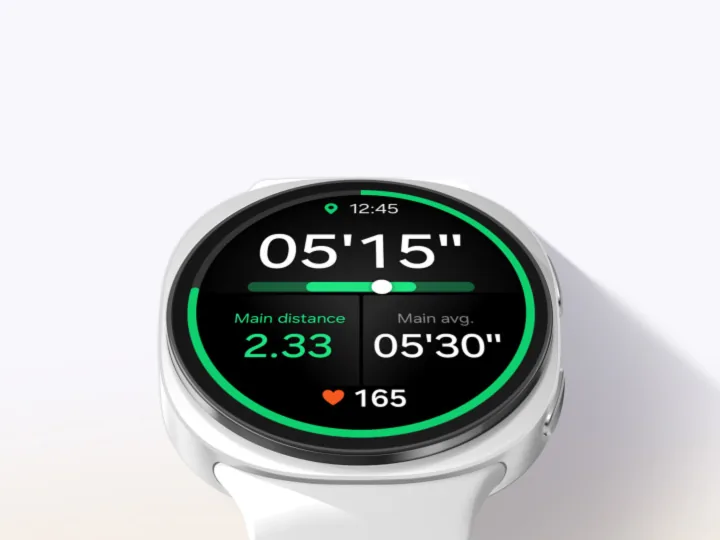
Measurement flows for key metrics like heart rate, stress and body composition have been refreshed with vibrant graphics and dynamic animations. Workout handling is enhanced: users can pause or end workouts using the back button without touching the screen, and on-screen information now includes large text and intuitive heart rate zone displays. A new daily cardio load feature monitors the impact of exercise on the heart, provides a target load range that adjusts daily based on recent activity and goals, and indicates when rest is advisable.
The watch can monitor vital signs during sleep—including heart rate, heart rate variability (HRV), respiratory rate, skin temperature and blood oxygen—establish a baseline, then continuously track and alert on significant changes. A daily heart health score is calculated from sleep, exercise, BMI and vascular stress to summarize heart health, and new shortcut tiles now support quick access to more health features such as daily activity, sleep coaching and daily cardio load.
Other system, navigation and camera enhancements
A compass feature aids outdoor navigation by allowing users to mark waypoints (for example where a car is parked or a tent is set up) and receive directional guidance. A “return to start” (backtrack) function records the path so users can retrace their steps.
The Camera Controller on the watch gains new modes, including Food, Portrait Video, Slow Motion and Hyperlapse. Swiping up from the bottom of the Camera Controller screen reveals settings to switch between front and rear cameras and toggle options such as Motion Photo and flash.
The update also adds customizable text size for tiles.
This release delivers the official One UI 9 Watch changelog items above and will be distributed to additional regions in the coming days.
